How to Push to Protected Branches with GitHub Actions
Learn how to safely configure GitHub Actions to push updates or commits to protected branches without breaking your branch protection rules.
About Protected Branches
Protected branches are Git branches with rules that restrict direct changes, ensuring code reviews, status checks, or approvals before merging. In GitHub, there are two levels or paths to define and apply branch protection rules. The first one is branch ruleset and another one is classic branch protection rule. In general, there are similarities among them so, let’s explore how to setup branch protection rule in order to push to the protected branch in GitHub.
Generate Deploy Key
Run the following command (with an empty passphrase):
1
ssh-keygen -t ed25519 -C "email address"
Add GitHub Deploy Key And Secret
Go to Repository -> Settings -> Deploy keys and:
- Add new key with write access and paste the generated pub file contents.
- In Secrets and variables page, create new repository secret (e.g. DEPLOY_KEY) and paste the contents for SSH key generated previously.
Pub file value -> DEPLOY_KEY; SSH key -> GHA secret
Add DEPLOY_KEY in GitHub Actions Workflow
1
2
3
4
5
6
 - name: checkout code
   uses: actions/checkout@v4
   with:

    ssh-key: ${{ secrets.DEPLOY_KEY }}
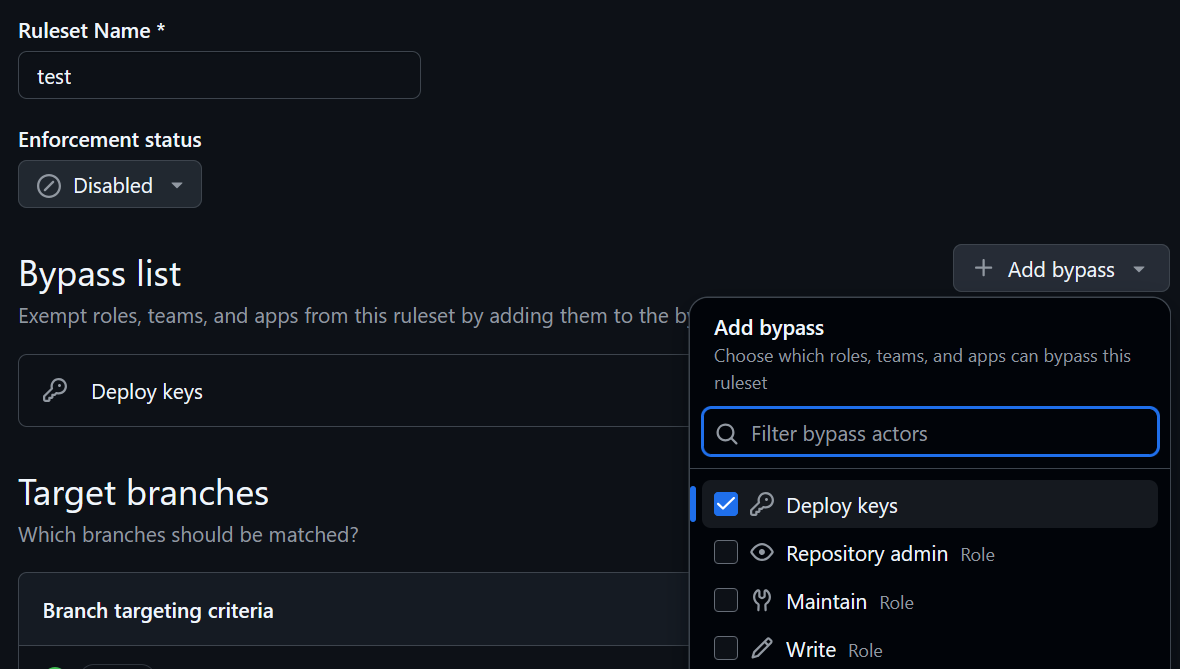
Add Deploy Key To The Branch Protection Bypass List